What gets recorded and how analysis works
Recorded for every session
Per session: project, branch, Claude Code version, start/end, wall and active time (idle gaps over
15 min excluded), human prompts (including ones queued while Claude worked), slash commands,
interrupts, compactions, every tool call with duration and success, files read/edited with
line counts, subagents and workflows with their own usage, skills, MCP servers, hooks, PRs and
artifacts, and token usage per API call (deduplicated per message) with an API-list-price cost
estimate. Estimates match Claude Code's own cost-state to the cent for single-process sessions;
subscription billing differs.
Per analyzed session: title, summary, goal, outcome, work types, tags, highlights, open threads, friction, sentiment, and knowledge items:
| Kind | Meaning |
|---|---|
| fix | a failure, its root cause, and the fix |
| gotcha | a pitfall and how to avoid it |
| learning | an insight about a technology or the codebase |
| decision | a design choice and its rationale |
| pattern | a reusable technique or snippet |
| command | a useful invocation |
| fact | project layout, config, endpoints, deployment |
| preference | how you want Claude to work |
| reference | an external pointer |
| todo | a follow-up |
Claude's own auto-memory notes (projects/*/memory/*.md) and Codex's memory notes are imported as knowledge too.
Codex, Copilot, Bob and Antigravity sessions fill the same fields wherever their logs carry the data: Copilot Chat logs, for instance, have no cache split (so no cost estimate), Bob tasks have no per-call timings, and Gemini models in Antigravity have no price.
How analysis works
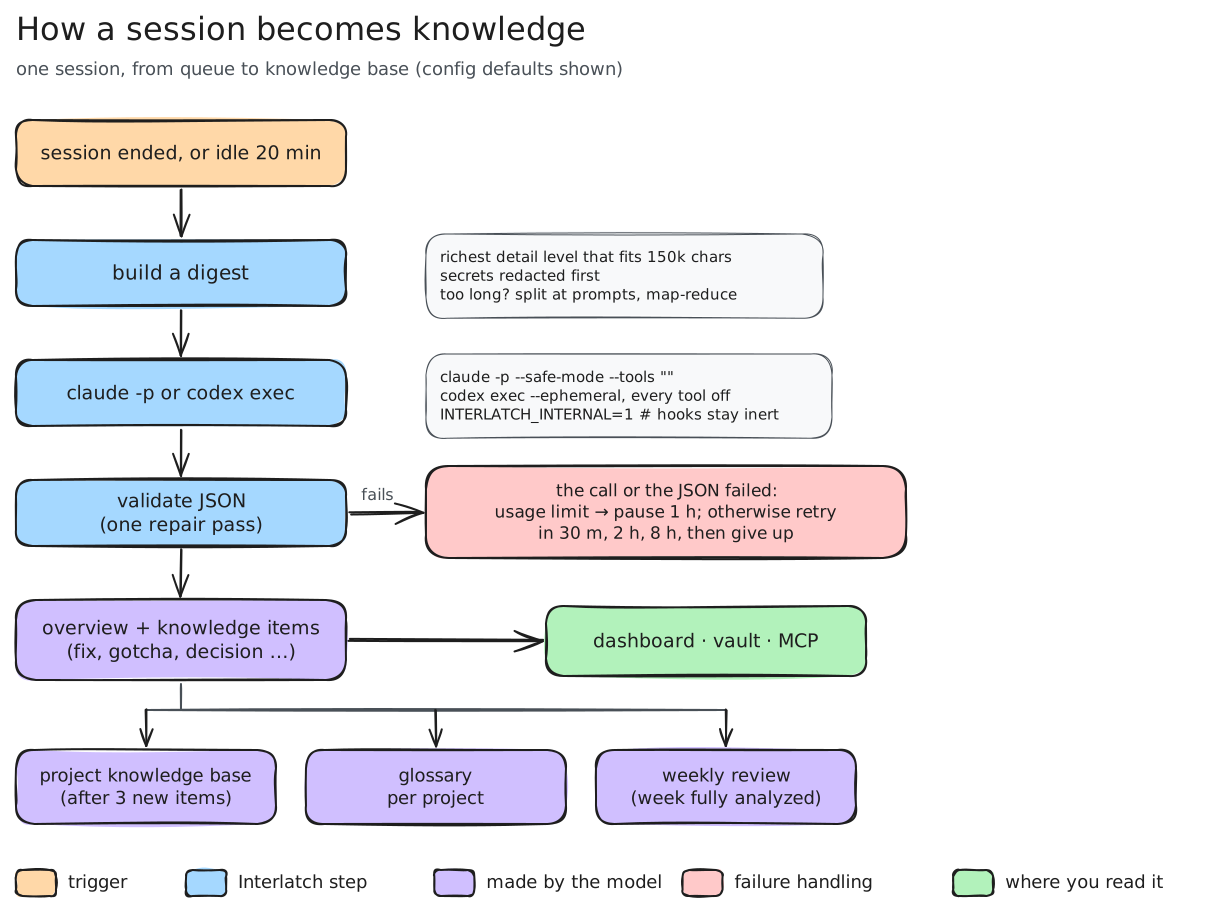
- A session is queued once it ends (hook) or has been idle for
idle_minutes. - The transcript is condensed into a digest at the richest detail level that fits
chunk_chars(full prompts and replies, one line per tool call, error excerpts, subagent reports). Very long sessions are split at prompt boundaries and map-reduced: each part's lessons are written once, and the final pass picks which to keep. Secrets are redacted first. - The digest goes to the agent or provider chosen in
analysis.backend, through your own login or key, sandboxed so that no session is written for the analysis itself, none of your hooks, plugins, MCP servers or instruction files load, and the model can only answer: - Claude Code (
backend = "claude", the default):claude -p --no-session-persistence --safe-mode --tools "" --strict-mcp-config. - Codex (
backend = "codex"):codex exec --ephemeral --ignore-user-config --sandbox read-only, with every tool feature switched off (shell, code execution, sub-agents, apps, plugins, web search, images), hooks,AGENTS.mdand skill instructions off, and Interlatch's instructions in place of Codex's own. Codex cannot switch off every tool by flag, so Interlatch also reads its event stream: a reply that follows any tool call is thrown away and the analysis counts as failed. -
IBM Bob (
backend = "bob"): Bob Shell'sbob run --format stream-json --max-turns 1 --disable-mcp --disable-subagents, with every tool group disabled, in a throwaway workspace whose custom mode holds Interlatch's instructions and no tools; as with Codex, a reply that follows any tool call is thrown away. Headless runs need a Bob API key (the app's sign-in isn't used):interlatch config set-key bob, the IBM Bob tab in Status › Analysis, orBOB_API_KEY. Bob picks its own model. It keeps each analysis in its own task list; Interlatch doesn't import those as sessions. -
A model provider's API (
backend = "anthropic","bedrock","openai","azure","openrouter","ollama"or"openai-compatible"): one plain HTTP request per call, with no tools in it, so the model can only answer. See Model providers.
Each agent's tab in Status › Analysis sets its model: for Claude Code, one for sessions (analysis.model), one
for knowledge bases (synthesis.model) and one for screening imported chats (analysis.screen_model), each an
alias (sonnet, opus, haiku, fable) or a full model id such as claude-opus-5-5; for Codex,
analysis.codex_model (empty: Codex's default). Both share analysis.effort.
INTERLATCH_INTERNAL=1 makes Interlatch's own hooks inert for these runs. Switch in Status › Analysis, with
interlatch config set analysis.backend codex, or for one run with interlatch analyze --backend codex.
4. The JSON reply is validated leniently (with one repair pass) and stored. When a project gains
min_new_items new items, its knowledge base is re-synthesized; items that are outdated, contradicted or
duplicated get marked superseded, each naming the item that replaced it (pinned and memory items are never
superseded). A duplicate also counts as a confirmation: see how knowledge earns trust. Once every session of
a finished week is analyzed, the model writes that week's review (a three-line TL;DR, themes, accomplishments,
learnings, open threads, recurring friction, concrete workflow suggestions). Knowledge bases, the playbook and
reviews are written to be skimmed: a TL;DR, a short overview, a title per knowledge-base bullet, and word
limits on every field. A project's knowledge base also gets an
architecture sketch, kept only where cited items back it. The review's numbers and charts come from the database, not from the model.
5. Usage-limit or auth errors pause analysis for an hour; other failures back off 30 min → 2 h → 8 h.
Calls have a wall-clock deadline, and a call frozen by the Mac going to sleep is killed right after wake and
re-queued without counting as a failure. Sessions that continue after being analyzed are re-analyzed.
A session that is not analyzed yet always says why: on its page, in Status › Analysis (a count per
reason) and in interlatch status. Queued reasons clear by themselves (ready for the next run, still active,
waiting to retry); held ones need a change first (project excluded, too few prompts, from before install
with backfill off, failed four times). When the whole queue is stopped (paused for a usage limit, automatic
analysis off, or the analyzer not found), that is said too.
Analyze N now under the queue analyzes the sessions ready now at once, instead of on the next background
run, even with automatic analysis off or during a usage-limit pause; when one gets through, the pause is lifted.
When nothing is ready but sessions are still active, it offers those instead: one that continues is analyzed
again later. The command palette (⌘K) has it too, as Analyze the queue now.
Language
Interlatch writes in English unless [analysis] language is ja (Configuration, or
Status › Analysis). Then summaries, knowledge, knowledge bases, the playbook, glossary definitions and theme names,
weekly reviews and screening reasons are written in Japanese. Identifiers, commands, paths, error messages and quotes
stay as they were, and so do tags and the codes Interlatch reads back (kinds, outcomes, verdicts). The setting applies
to what is analyzed or synthesized from then on; earlier sessions keep their language until they are analyzed again.
Synthesis treats items in different languages that state the same lesson as duplicates, so they merge and confirm
each other. The dashboard's own words follow the language chosen in the dashboard, per browser, whatever this
setting says.
How knowledge earns trust
Every knowledge item has a stage, which says how far it has been confirmed:
| Stage | Shown as | Earned by |
|---|---|---|
wip |
tentative | one session, and the analysis was unsure (low confidence) |
provisional |
seen once | one session |
established |
established ×N | the same lesson in 2 or more sessions; also Claude Code and Codex memory notes, and items you add |
canonical |
canonical ×N | the same lesson in 3 or more sessions spread over at least 14 days, or pinned by you |
The evidence comes from synthesis: when it finds that an item from one session states the same lesson as an item from another, it reports the pair as a duplicate, and the surviving item takes over the other's sessions. The stage is then computed from those sessions and their dates, not judged by the model, and the reason is stored with it ("confirmed in 3 sessions over 19 days (2026-09-01 → 2026-09-20)"). Items that are merely related stay separate, and the cross-project playbook pools evidence without retiring anything. Re-analyzing a session keeps what its items had earned.
Stages are used wherever knowledge is read: searches and the SessionStart digest list the most trusted items first,
the MCP tools label each item ([gotcha · established ×3]), knowledge-base bullets carry the stage of their best
source, and syntheses see each item's stage. Leaving the ladder is a status, not a stage: a superseded item keeps
its stage and names its successor, and when an established or canonical item is overturned by a newer one (not
just merged as a duplicate), that week's review lists it under Overturned.
Case files
Fixes, gotchas and decisions are also kept as case files, so you can learn from them as well as look them up. For each one the analysis records:
- The scene: what was being done and what showed up first, before the cause was known. For a decision, the problem it had to settle.
- The question the scene raised, and the answer in a few words.
- Leads ruled out: what the session tried and found wrong, each with what showed it wrong. For a decision, the options turned down. Only dead ends the transcript shows: the analysis is told never to make one up.
In Knowledge › All knowledge, a case you haven't answered opens with its scene and question. The choices are the real answer and up to two of the ruled-out leads. Pick one and the card says whether it was right; a ruled-out lead comes with what ruled it out. Then it shows the lesson. A case with no ruled-out leads asks you to think of your answer first. Skip, just show me opens a case at once, and after five skips in a row cases open with their answer until you turn Ask first back on. A search shows answers straight away, and so do session pages and the list layout. Case files, in the filter row and on the Knowledge page, lists only the cases. What you answered stays in that browser: it isn't stored in the archive or sent to a hub.
Agents get the scene and the ruled-out leads too: the MCP tools show them under each lesson, so an agent can recognize the symptom and skip the dead ends. A hub keeps the case files of the lessons computers share with it; teammates' lessons sent back to members don't carry them yet.
For Learn from your work the analysis also keeps, for fixes, gotchas, decisions, learnings and patterns alike, only where the session supports them: the principle (the general idea the lesson is an instance of, stated so it applies to other work), checks for similar work next time, the topics it teaches, and a small diagram when the explanation describes a flow, connected parts or real alternatives. Each is left empty rather than made up. When a session revised a finding or a decision, the lesson states where it ended up.
Lessons from an earlier version have no case file, principle or diagram. A session's lessons get them when it is
analyzed again (interlatch analyze <session>), which uses your analysis login or key like any other analysis.
Model providers
Instead of a coding agent, analysis can call a model provider's API with your own key. Pick API provider in Status › Analysis, choose the provider, fill in its model (and endpoint where it has no default), add a key, then Test connection and Use for analysis. From the terminal:
interlatch config set providers.openai.model gpt-5.5
interlatch config set-key openai            # asks for the key; it stays out of your shell history
interlatch config set analysis.backend openai
| Provider | backend |
Endpoint | Sign-in |
|---|---|---|---|
| Anthropic | anthropic |
https://api.anthropic.com |
API key (ANTHROPIC_API_KEY) |
| Claude in Amazon Bedrock | bedrock |
https://bedrock-mantle.<region>.api.aws/anthropic, from region |
Bedrock API key (AWS_BEARER_TOKEN_BEDROCK), or your AWS credentials: environment keys, or whatever aws configure export-credentials resolves (SSO, roles, profile), signed with SigV4 |
| OpenAI | openai |
https://api.openai.com/v1 |
API key (OPENAI_API_KEY) |
| Azure OpenAI | azure |
https://<resource>.openai.azure.com/openai/v1, from resource |
API key (AZURE_OPENAI_API_KEY), or Microsoft Entra ID through az login |
| OpenRouter | openrouter |
https://openrouter.ai/api/v1 |
API key (OPENROUTER_API_KEY) |
| Ollama | ollama |
http://localhost:11434 (or OLLAMA_HOST) |
none: the model runs on your computer and nothing leaves it |
| Any Chat Completions server | openai-compatible |
yours, e.g. LM Studio, vLLM, Groq, Gemini's OpenAI endpoint | optional key |
- Models.
modeldoes the analysis and builds knowledge bases;small_modelscreens imported chats (default:model). Interlatch's settings name Claude models (sonnet,haiku): with a provider they meanmodelandsmall_model. Anthropic and Bedrock default to Claude Sonnet 5.5 and Claude Haiku 4.5; the others need a model. On Azure, the model is your deployment's name. - Keys are stored in
provider-keys.jsonin Interlatch's folder, readable by your user only, never inconfig.toml. A stored key wins over the environment variable, so the dashboard (which launchd starts without your shell's variables) and the CLI use the same key. The dashboard never shows a key back, and only the computer itself (or an admin of a hub) can change keys and endpoints. - Local models (Ollama). Interlatch calls Ollama's own
/api/chatwithnum_ctx(default 32,768 tokens) and sends 60,000 characters of transcript per call (chunk_chars). A prompt that fills the context window is an error, not a silent cut. Lessons are only as good as the model: a 1B model writes thin, generic ones, so pick the largest model your computer runs comfortably. - Output. OpenAI-style providers are asked for a JSON object (
json_mode; off foropenai-compatible, since not every server supports it). A reply cut off at the output limit is an error that namesmax_output_tokens. Anthropic and Bedrock calls sendeffortand allow 32,000 output tokens by default.
Cost: with a provider, the cost is what the API reports (OpenRouter) or an estimate from the token counts at
Anthropic's or OpenAI's list prices (Anthropic, Bedrock, OpenAI); Azure, Ollama and other servers show tokens only. Otherwise,
analysis runs through your own Claude Code or Codex login, or your Bob API key (Bob reports what each analysis cost).
With Claude, the reported cost is the API
list-price equivalent: sessions averaged about $0.38 each with Sonnet (digests average ~150k characters), and
max_budget_usd caps each call. Codex reports tokens but no price, so Codex analyses show no cost. On a Claude or
ChatGPT subscription the usage is drawn from the plan's allowance rather than billed. interlatch analyze --pending
--dry-run sizes a backlog before you spend anything.