Skip to content
Interlatch

Shared memory for your coding agents

Different agents.
Knowledge that stays.

Each new session starts without what the last one figured out. Interlatch records your Claude Code, Codex, Copilot, Bob and Antigravity sessions on your own Mac. Each lesson stays linked to the session, project and agent it came from, and earns trust as later work confirms it.

エージェントが変わっても、学びは残る。

uv tool install --python 3.13 interlatch && "$(uv tool dir --bin)/interlatch" install

Interlatch was called Chronicle: chronicle still works, and your sessions and settings move over automatically. Moving from Chronicle

macOS 13+ · needs uv · free and open source · no telemetry

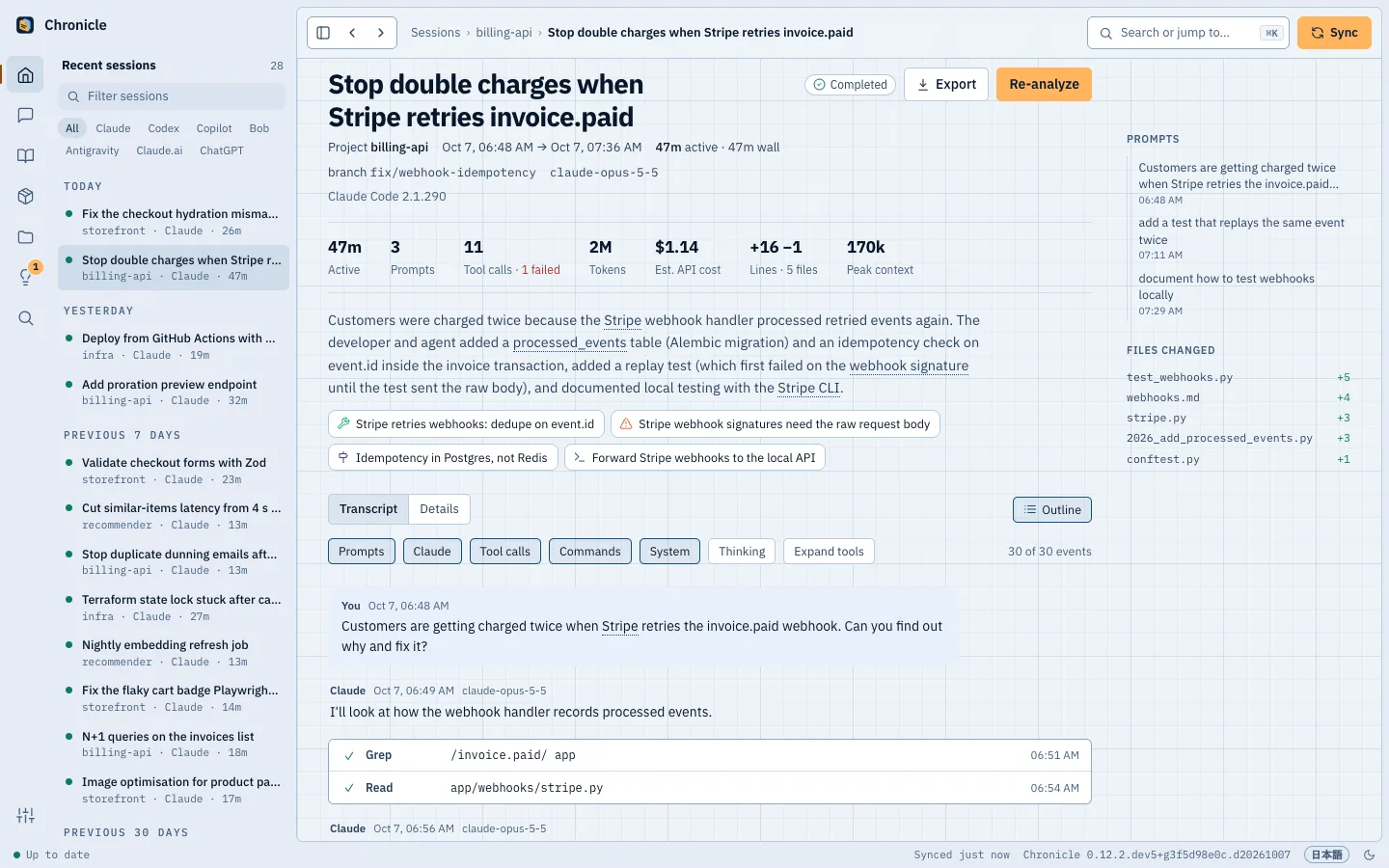
Shared memory · billing-apiFig. 01

Today 14:52 · Claude Code · fix/webhook-idempotency

Stop double charges when Stripe retries invoice.paid

completed · 4 lessons kept

Gotcha

Stripe webhook signatures need the raw request body

Parsing to JSON first fails with SignatureVerificationError. Read await request.body() and pass that.

Tink, Interlatch's guide from the Blueprint Cast: a small robot ticking items off a clipboard

Next session · Codex

I'll use the raw request body. The earlier Claude Code session explains why.

Source kept · Claude Code · billing-api

Example · learned in Claude Code, used in CodexTink keeps the record

01 / Set up

Connect your agents. Keep what they learn.

Interlatch installs with uv and reads your agents' session files without changing them. It keeps the record and has the lessons ready for the next session. The analysis runs through your own Claude Code or Codex login, IBM Bob with a Bob API key, or a model provider's API with your own key: Anthropic, Amazon Bedrock, OpenAI, Azure OpenAI, OpenRouter, or Ollama on your own Mac. It counts toward your own plan or key, and the sessions from before you installed are analyzed in the background, newest first, six every 15 minutes.

  1. Step 01

    Install

    Install the command line, then let it find the coding agents on your Mac, import their past sessions and start from login.

  2. Step 02

    Work as usual

    Use Claude Code, Codex, Copilot, Bob or Antigravity as you always do. Each session is recorded once it ends and read in the background.

  3. Step 03

    Carry the context forward

    Search earlier work with ⌘K in the dashboard at 127.0.0.1:11524, or let a connected agent retrieve project knowledge through MCP before it tackles the next problem.

uv tool install --python 3.13 interlatch
interlatch install

NeedsmacOS 13 or later, uv, and an agent login or API key for the analysis

Prefer an app? Download it for Apple siliconWhat the install sets up

02 / Memory that carries forward

Keep the work. Carry it forward.

A session ends. Its lessons stay with the project, linked to the work that produced them and ready for another agent to retrieve.

  1. Entry 01 · Keep

    Keep the session behind the fix.

    Claude Code clears transcripts after 30 days by default. Interlatch keeps sessions from the agents you connect, with their project and source, so the conversation behind last month's fix is still there when you need it.

    What gets recorded
    Archive · all agentsFig. 02
    • today

      Stop double charges when Stripe retries invoice.paid

      Claude Code · billing-api

    • today

      Fix the checkout hydration mismatch on delivery dates

      Codex · storefront

    • 1d

      Deploy from GitHub Actions with OIDC instead of access keys

      Copilot · infra

    • 2d

      Cut similar-items latency from 4 s to 7 ms with an HNSW index

      Claude Code · recommender

    • 40d

      Set up the recommender repo

      Claude Code · recommender· deleted on day 30 kept

    Raw transcripts kept for good, on your Mac
  2. Entry 02 · Learn

    Keep the lesson attached to its evidence.

    Interlatch reads each finished session with the agent or model you choose, and keeps fixes, gotchas, decisions and commands as project knowledge. Each lesson points back to its source session and earns trust as later work confirms it, so you can check the reasoning before reusing the answer.

    How analysis works
    Knowledge · billing-apiFig. 03

    Fix

    Stripe retries webhooks: dedupe on event.id

    Record each event.id in processed_events in the same transaction as the side effect, and return 200 for repeats.

    Decision

    Idempotency in Postgres, not Redis

    The dedupe row commits atomically with the invoice update; a Redis key could be written while the transaction rolls back.

    Command

    Forward Stripe webhooks to the local API

    stripe listen --forward-to localhost:8000/webhooks/stripe

    Kept with source sessions, then confirmed by later work
  3. Entry 03 · Share

    Let the next agent use what the last learned.

    A Copilot session finds why a deployment failed. Later, Codex can retrieve that lesson through MCP, see the source and use the fix. Connected agents search the same project memory, even when you switch tools or start a fresh session.

    The MCP server
    Example · Codex · infraFig. 04

    you › the deploy fails with "Not authorized to perform sts:AssumeRoleWithWebIdentity". seen this before?

    ● interlatch · search_knowledge("AssumeRoleWithWebIdentity")

    └ 1 gotcha · infra · Copilot · established ×2

    Codex › Yes. A Copilot session in infra found this last week. For jobs with environment:, the OIDC token's sub is repo:ORG/REPO:environment:NAME, so a trust policy matching the branch fails. I'll match the environment instead.

    Source · Copilot · Deploy from GitHub Actions with OIDC instead of access keys

    Codex retrieves a lesson from an earlier Copilot session
  4. Entry 04 · Trace

    Follow the code back to the decision.

    The VS Code extension shows the sessions behind the file you have open, across the agents that worked on it. Open the original conversation to see what changed, why it changed and what the next agent should know.

    The VS Code extension
    VS Code · ExplorerFig. 05

    ▾ Interlatch: This File webhooks.py

    ▾✎Stop double charges when Stripe retries…5h ago

    • ◷5h ago · Today 14:52
    • ◉Claude Code · billing-api
    • ⑂fix/webhook-idempotency
    • ±+38 −4 lines
    • ✓Outcome: completed
    • ↗Open in Interlatch

    ▸✎Stop duplicate dunning emails after deploys3d ago

    ▾ Interlatch: Files in Workspace

    • ▸alembic/versions2 sessions · 5h
    • ▾app6 sessions · 5h
    • billing.py3 sessions · 3d
    • webhooks.py2 sessions · 5h
    • ▸tests4 sessions · 5h
    The agent, project and source session behind the code

03 / The dashboard

A memory you can inspect.

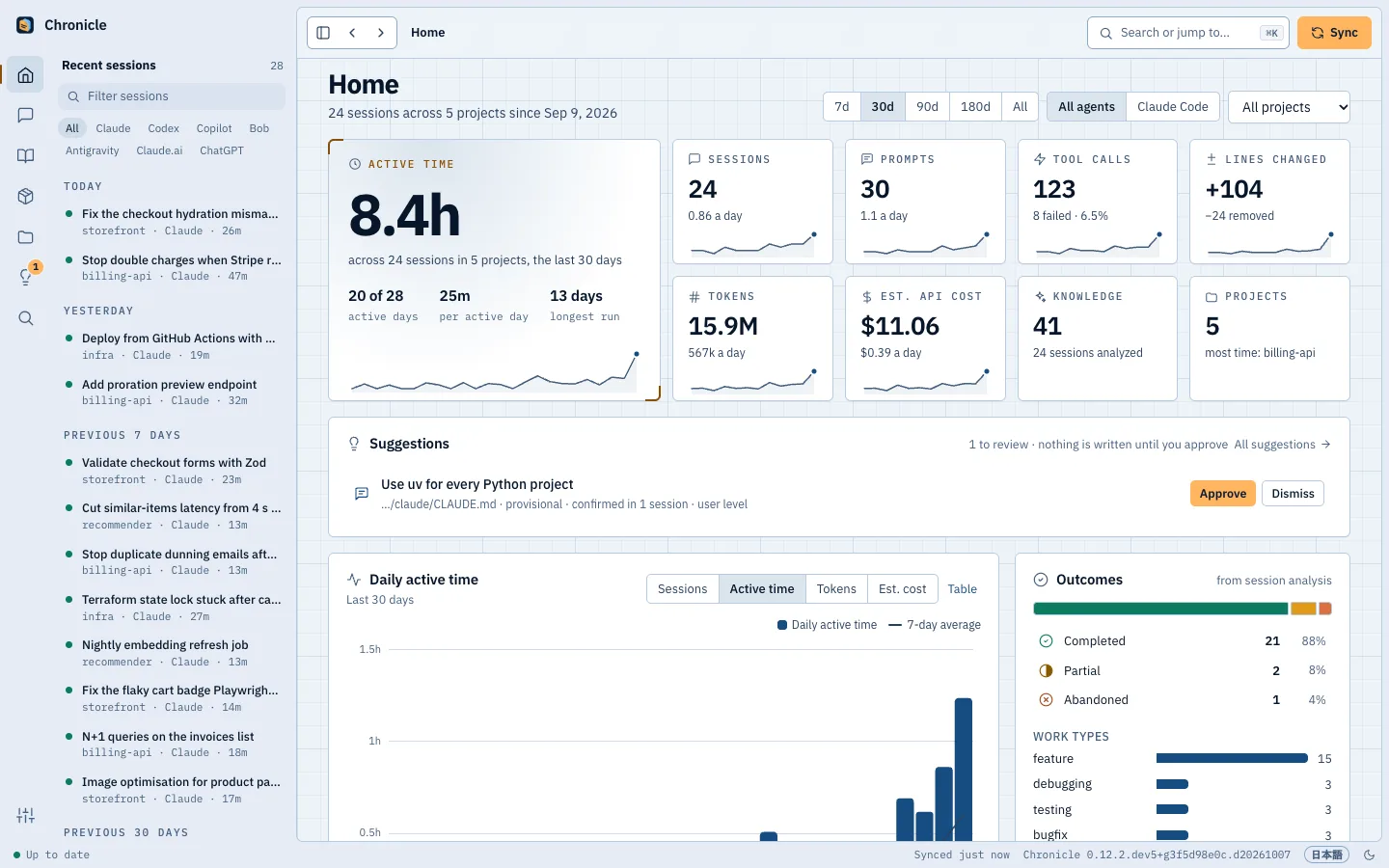
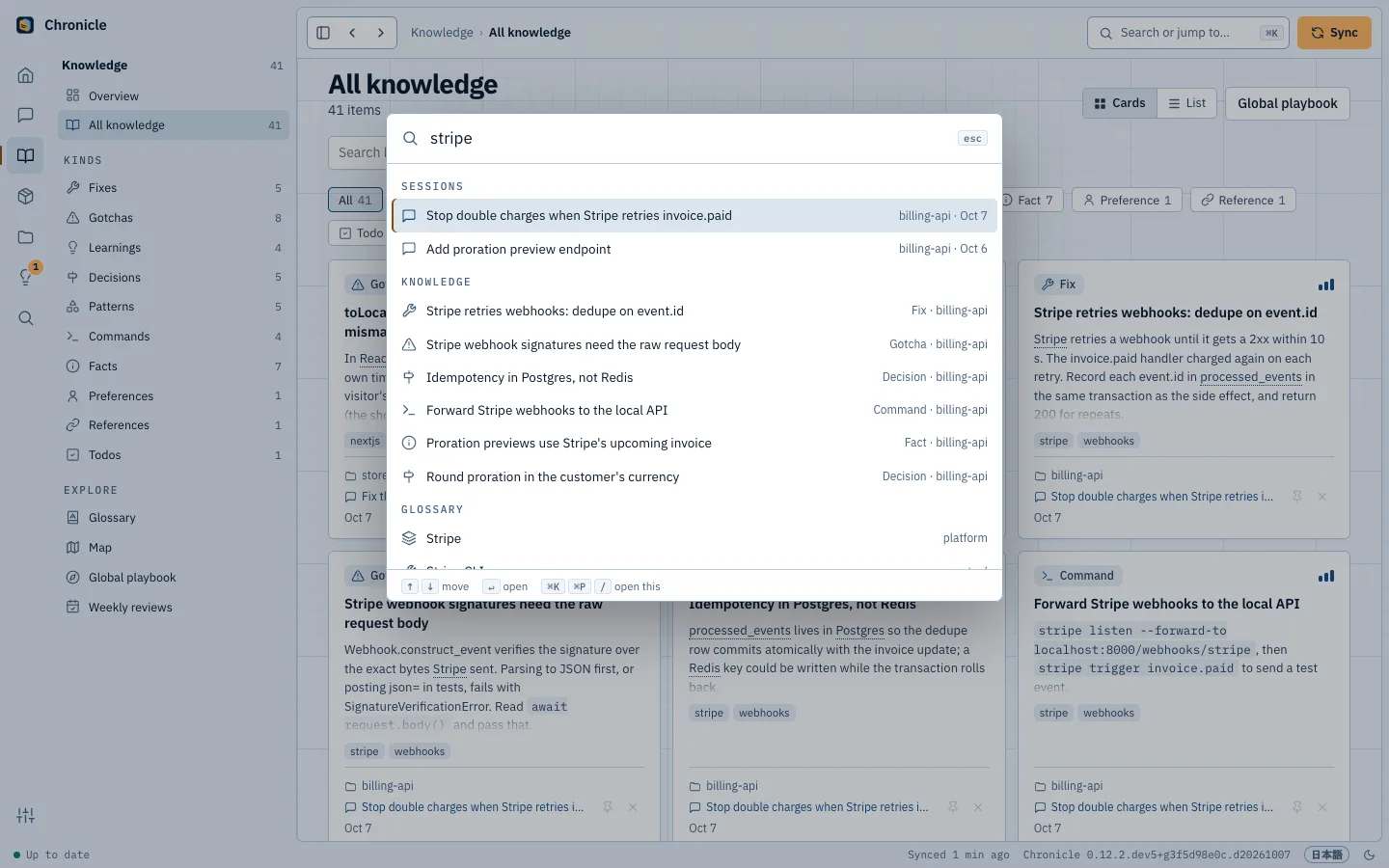
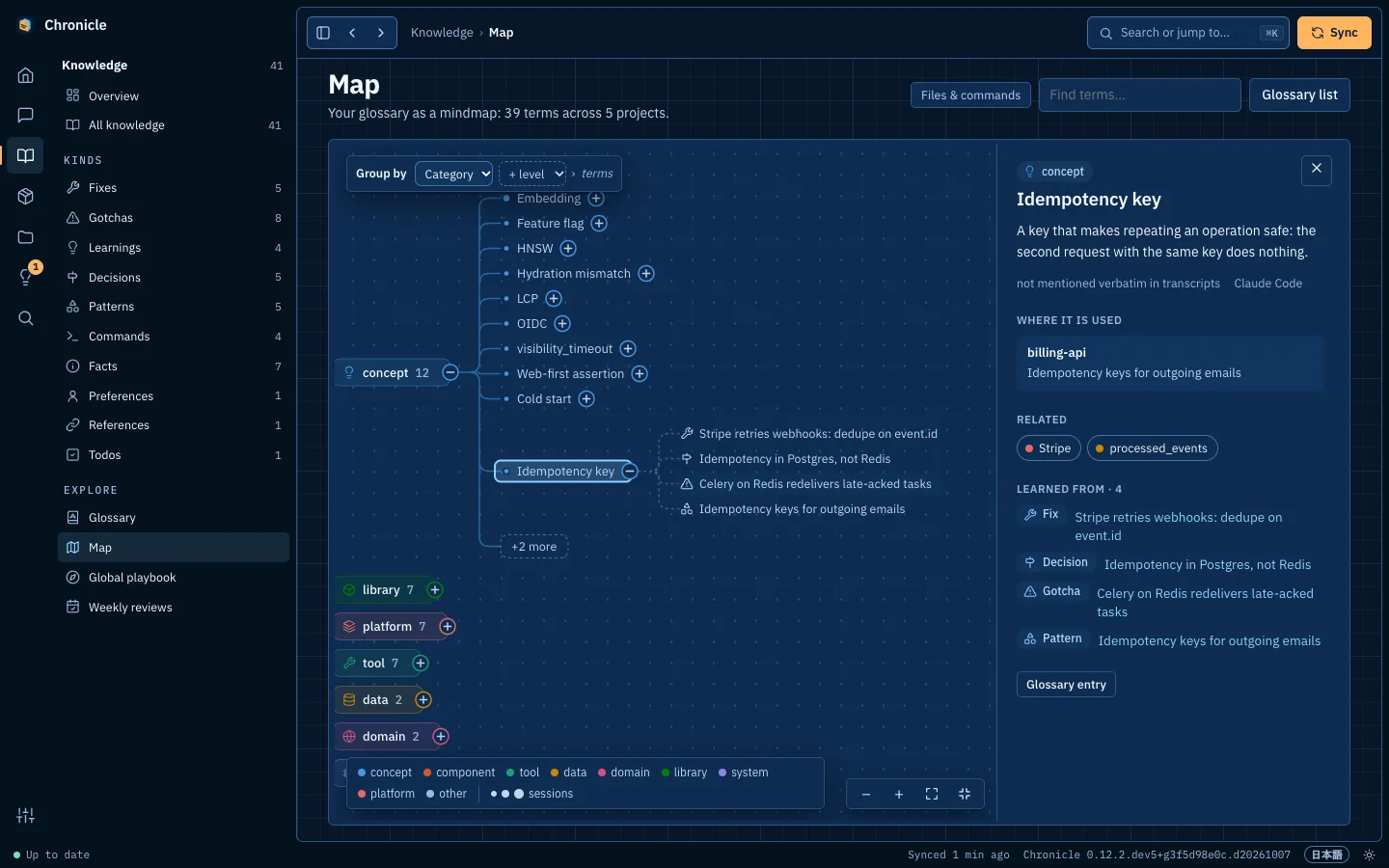
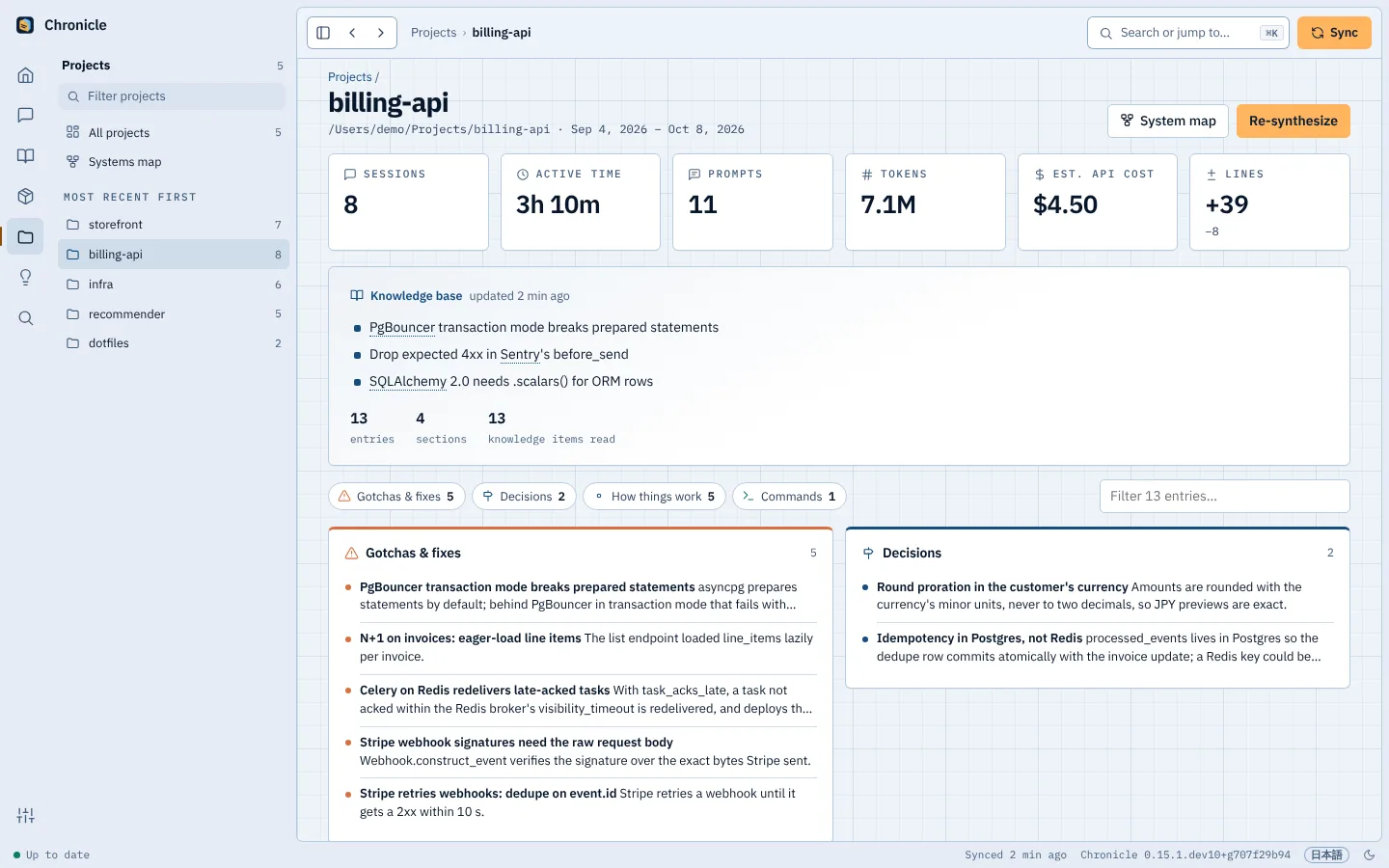
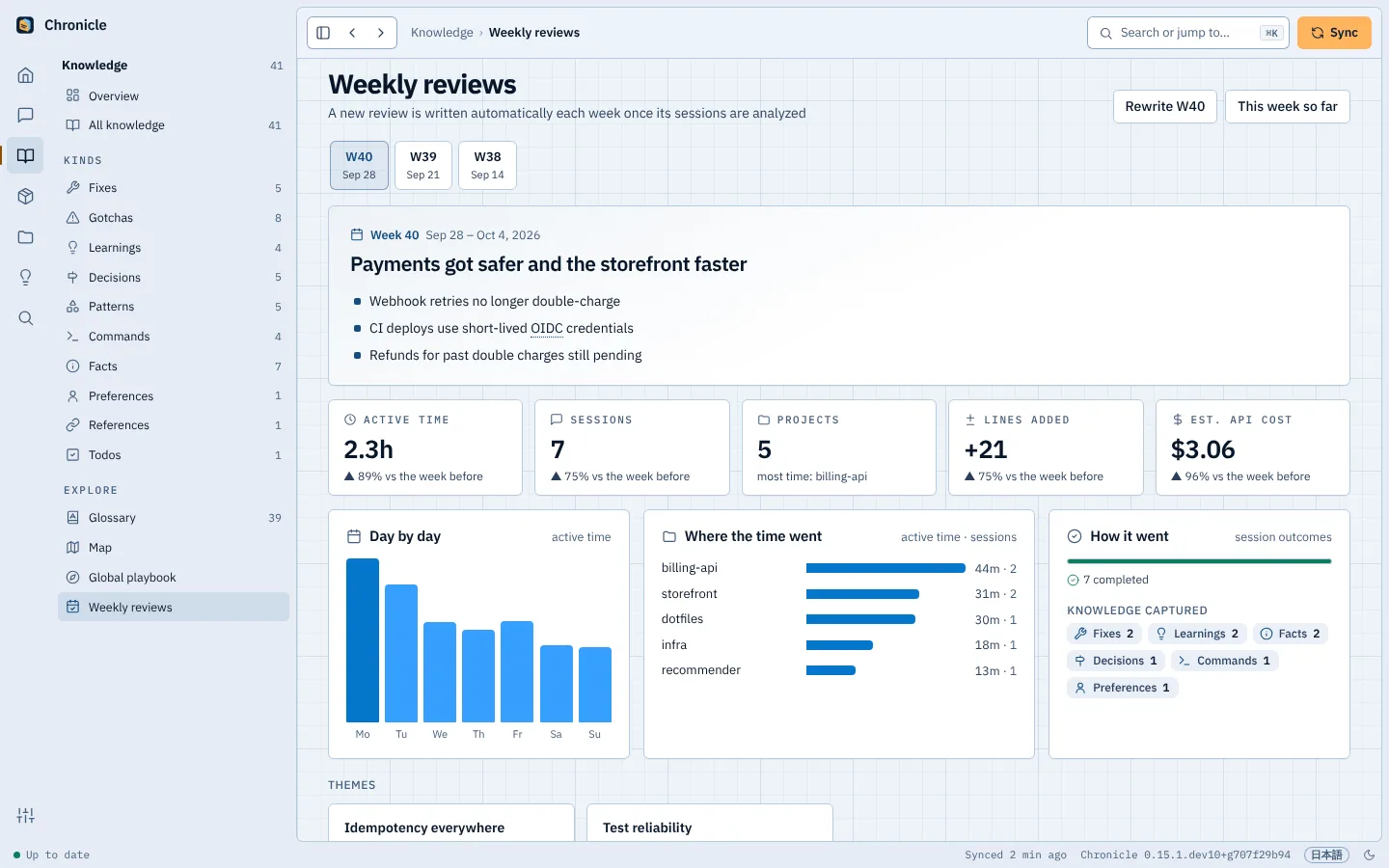
Browse sessions from different agents, inspect the lessons they produced and open the source conversation. The dashboard runs on your own machines: on your Mac, on your phone through Tailscale, or on one hub that your other computers and your team share.

A one-minute tourFig. 06
Home, a session with what it taught, ⌘K search, the Map and a weekly review.Made-up demo data

Screen by screen

Interlatch's Home page: this week's sessions, stats and recent knowledge
This week at a glance: sessions, what they cost, what they taught.Made-up demo data

Also in the dashboard

  • Systems map

    Every project as a system, with its parts and where it is deployed, and lines where one project uses another. Drawn from your manifests and what sessions did, never by a model.

  • Artifacts

    The documents, pages, diagrams, decks, pull requests and commits your agents made, each linked to its session and marked when the file has changed or is gone.

  • Suggestions

    Lines for CLAUDE.md or AGENTS.md from what keeps going wrong and what keeps being confirmed. Nothing is written until you approve it, and Undo takes it back out.

  • Project groups

    Put related projects under one heading, by hand or by the folder they share, and filter sessions by the whole group.

04 / Across agents

One record for every agent.

Bring sessions from the tools you use into one archive and project knowledge base. Keep working in the agent that suits the task; the earlier work stays searchable. Add sources from Settings or with interlatch connect.

  • Claude Codeas each session ends
  • Codexevery 15 minutes, once idle
  • Codex Cloudtasks, through the codex CLI
  • GitHub CopilotVS Code and Copilot CLI
  • IBM Bobevery 15 minutes
  • Google Antigravityevery 15 minutes
  • claude.ai and ChatGPTfrom your data export
  • Make that memory available to Claude Desktop, Cursor, Windsurf and Gemini CLI through the MCP server.

05 / Your team

One agent learns it. The whole team knows it.

Run a hub on a server your team already has, and each person's Interlatch shares what it learned there. Transcripts can stay on each computer: the hub takes the lessons, and hands everyone's agents what their teammates learned in the same repositories.

  1. 01

    A hub in Docker.

    One compose file runs the hub, HTTPS through Caddy and a Postgres team store on any server. The hub analyzes nothing, so it needs no model and no API key.

  2. 02

    Lessons travel, transcripts stay.

    Each computer analyzes its own sessions and sends the hub only each one's summary and the project's lessons. Prompts, commands, file paths and transcripts never leave it.

  3. 03

    Teammates' lessons, in your agent.

    After each push, your computer gets back what teammates learned in the same repositories, wherever each person cloned them. The MCP tools include them, marked as teammates', and so do start-of-session notes if you turn them on.

  4. 04

    People, roles and projects.

    Invite each person as an admin, a member or read-only with a one-time code. Admins choose which projects each person sees, and every invite, sign-in and change goes into an audit log.

Hub · billing-apiFig. 07

Mika's laptop

  • Transcript, prompts, commands● stays here
  • Session summary↓ sent
  • 3 lessons about billing-api↓ sent

The team's hub

billing-api · 4 people · 58 lessons

Gotcha

Stripe webhook signatures need the raw request body

from Mika's sessions

↓ Your agent, next session

From teammates' sessions in this project (via the team hub):

- [gotcha] Stripe webhook signatures need the raw request body (from Mika)

Knowledge only: the transcript never left Mika's laptop

06 / RSI

The good kind of RSI.

Record, Search, Increment. Not the sci-fi kind of recursive self-improvement, and not the sore-wrists kind either: nobody types the same explanation twice.

  1. Record

    Every session from the agents you connect, kept on your machine with its project, branch and files. Nothing to remember to save.

  2. Search

    The next agent looks up what earlier ones learned through MCP, each answer with the session behind it. Turn on start-of-session notes and Claude Code also gets the project's digest as it opens.

  3. Increment

    Lessons earn trust as later sessions confirm them, and recurring stumbles become suggested rules for CLAUDE.md and AGENTS.md, which you approve one by one.

And round again, a little better every session, and you can see why.

07 / Memory you can trust

Shared context. Grounded in evidence.

Rule 1

It stays local.

No server of ours, no telemetry, no account. The archive and everything learned from it live on your own machines, and a team's hub runs on a server your team chooses.

Rule 2

Your models. Your accounts.

Analysis runs through your own Claude Code or Codex login, a Bob API key or your own provider key, with secrets redacted first. With Ollama, it never leaves your Mac. Memory retrieved through MCP goes only to the agent you connected and its model. No key of ours in the middle.

Rule 3

Keep the evidence in reach.

Each lesson shows how far it's been confirmed: seen once, established ×2, and canonical once three sessions spread over two weeks or more agree. The session it came from is one click away, and agents get the same label through MCP, so you and they can judge whether it fits the work ahead.

Give the next agent a head start.

Bring in the sessions already on your Mac and connect the agents you use. Keep what they learn attached to your projects, ready to carry into the next task.

uv tool install --python 3.13 interlatch && "$(uv tool dir --bin)/interlatch" install

Needs uv and macOS 13 or later.

FAQ

Frequently asked questions.

Setup, privacy, and how your agents use the memory.

Ask the community
Which agents can I connect?

Interlatch records Claude Code, Codex, GitHub Copilot, IBM Bob, and Google Antigravity sessions. You can also import claude.ai and ChatGPT data exports. Claude Desktop, Cursor, Windsurf, and Gemini CLI can search the memory through MCP; their sessions are not recorded.

Supported sources
Do I need Claude Code?

No. Choose Claude Code, Codex, IBM Bob, or a model provider's API for analysis. You can also use a local model through Ollama. Recording and browsing work without an analyzer; your sessions wait in the queue until you connect one.

Analysis and model providers
How much does it cost?

The personal app and CLI are free and open source under the MIT license. Analysis through Claude Code or Codex uses your existing plan's allowance; API providers bill your own account. A local Ollama model has no provider fee. Interlatch's displayed session costs are estimates, not your subscription bill.

How analysis works
Does my data leave my computer?

Sessions are stored locally. Analysis sends a condensed digest, with secrets redacted, to the agent or provider you choose; a local Ollama model keeps analysis on your computer. Interlatch has no telemetry. If you enable hub sharing, knowledge mode sends summaries and lessons, while everything mode sends raw, unredacted session files to your hub.

Data and privacy
Can I use it on Windows or Linux?

Yes. Interlatch runs on Windows and Linux with Python 3.11 or newer. Install the package from PyPI with pip install interlatch (or use uv), then run interlatch install and open the dashboard in your browser. Node.js is not required by Interlatch itself; an agent you connect may have its own requirements. Background jobs use Task Scheduler on Windows and systemd on Linux. The native desktop window is currently macOS-only; the browser dashboard works on all three platforms.

Installation by platform
How does my next agent use what was learned?

Connect the agent to Interlatch's MCP server. It can search earlier sessions and project knowledge across agents, and follow each lesson back to its source. You can ask it to look up a past error or decision; connecting MCP gives it access to search, rather than automatically adding every lesson to every prompt.

Connect through MCP
Can I exclude a project or delete a session?

Yes. Add project-path patterns to sources.exclude_projects in your configuration to keep those projects out. To remove an already recorded session, use interlatch forget <id>.

Configuration options
What happens when I uninstall?

interlatch uninstall removes hooks, background jobs, and MCP registrations while keeping your recorded data. Add --purge to delete the archive and settings too.

Uninstalling Interlatch

Resources & community

Keep up. Get involved.